$229.99
Amazon Rating
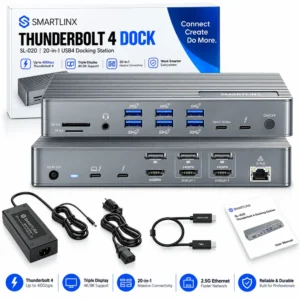
21-in-1 Connectivity:Turns one Thunderbolt port into 21 connections. Two Thunderbolt 4 ports run at 40Gbps. One HDMI port drives a monitor. Four USB-C and four USB-A ports handle drives and peripherals. Ethernet runs at 2.5Gb. Separate SD 4.0 and microSD 4.0 slots read camera cards. Three 3.5mm jacks cover the headset, microphone and speakers. Works with Thunderbolt laptops, desktop PCs and Mac Mini.
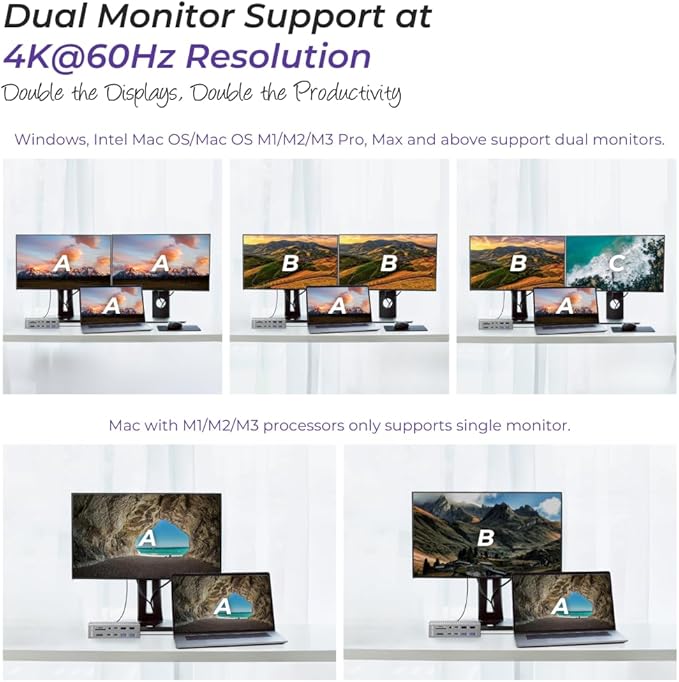
Dual 4K 60Hz Display: Runs two monitors at 4K 60Hz in mirror or extend mode through HDMI and Thunderbolt 4. (Important: MacBook Air and MacBook Pro with base M1, M2 or M3 chips support ONE external monitor — a limit inside the Mac, not the dock. M4, Pro and Max chips drive two.)
90W Charging, 30W Fast Charge: Charges the laptop at up to 90W from a 150W adapter. So the original charger stays packed. A dedicated USB-C port fast-charges phones and tablets at up to 30W. Thunderbolt ports give 15W each. A power button switches every device off without unplugging anything.
Works From 8th Gen Intel Onward: Runs at full 40Gbps on Thunderbolt 4, Thunderbolt 3 and USB4 covering business laptops back to 2017. Many Thunderbolt 4 docks need 11th Gen or newer. Moves files at 40Gbps for external SSDs and NVMe drives, with six USB ports at 10Gbps. (Note: on plain USB-C, runs at 10Gbps with one monitor; Ethernet and Thunderbolt ports stay off.)
2.5Gb Ethernet, Card Readers, 12-Month Warranty: Wired network at up to 2500Mbps, 2.5× the 1Gb ports common at this price. SD 4.0 and microSD 4.0 slots read camera and drone cards without an adapter. No drivers on Windows or macOS. Backed by a 12-month warranty from Smartlinx.
────────────────────────
① For volume orders or business inquiries contact info@smartlinx.pro

On 2 or more orders .
Returns within 30 days.
With Shop Pay, for US residents.
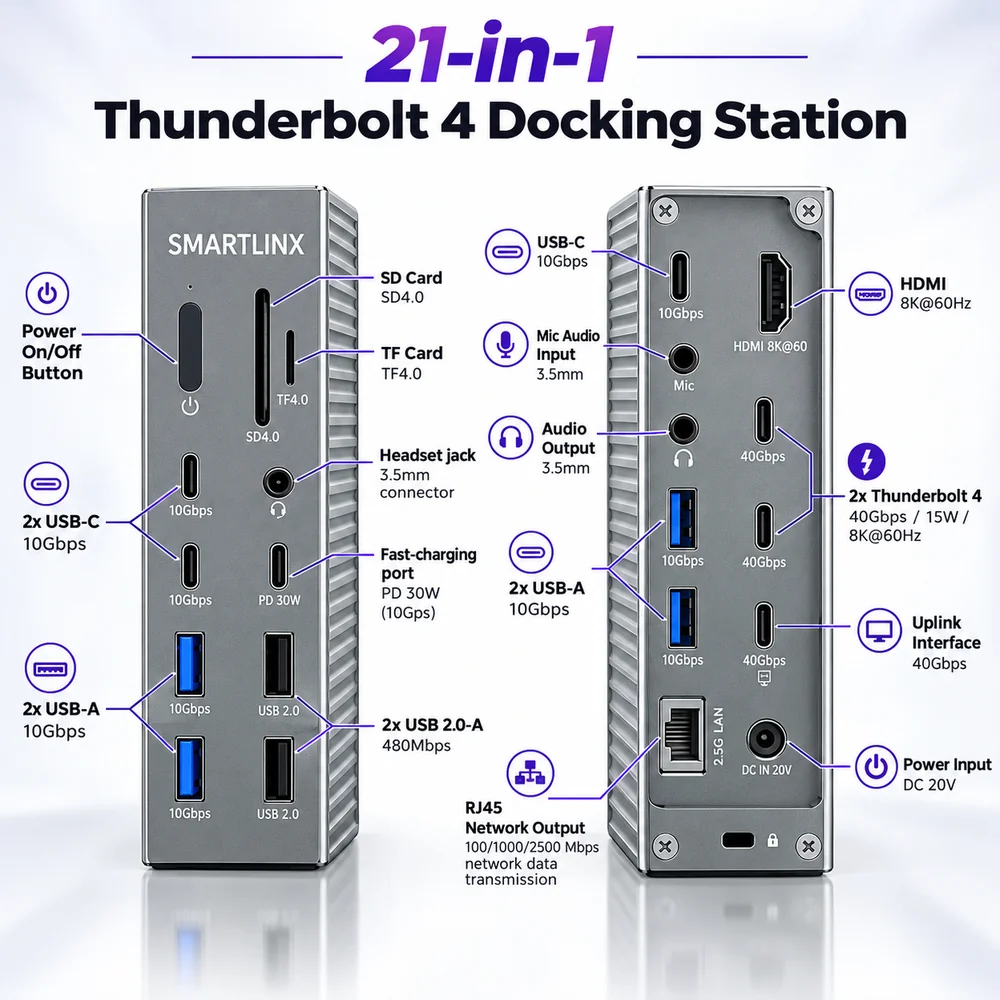
The Smartlinx SL-019 is a Thunderbolt 4 docking station. It turns one laptop port into 21 connections.A docking station sits on the desk and stays plugged in. Monitors, network cable, keyboard, mouse, headset and power all connect to the dock instead of the laptop. The laptop then joins the whole desk with one cable.The SL-019 stands upright in an aluminium case. Ports are split across two panels. The front panel holds the connections you change often, such as card readers and headsets. The rear panel holds the ones you leave plugged in, such as monitors, Ethernet and power.
────────────────────────
| Attribute | Value |
|---|---|
| Model | SL-019 |
| Product type | Thunderbolt 4 docking station |
| Brand | Smartlinx |
| Host interface | Thunderbolt 4, 40 Gbps |
| Total ports | 21 |
| Maximum external monitors | 2 |
| Maximum resolution | 4K at 60Hz per monitor |
| Video outputs | HDMI ×1, Thunderbolt 4 ×2 |
| DisplayPort output | None |
| Thunderbolt 4 downstream ports | 2, at 40 Gbps each |
| USB-C ports | 4, at 10 Gbps each |
| USB-A 3.2 ports | 2, at 10 Gbps each |
| USB-A 2.0 ports | 2, at 480 Mbps each |
| Total USB ports | 8 |
| Ethernet | RJ45, 100 / 1000 / 2500 Mbps |
| Ethernet standard | IEEE 802.3bz (2.5GBASE-T) |
| SD card reader | SD 4.0 |
| microSD card reader | microSD 4.0 |
| Audio connections | 3.5mm headset, 3.5mm mic input, 3.5mm audio output |
| Power adapter | 150W, 20V / 7.5A |
| Power input connector | DC barrel, 20V |
| Laptop charging | Up to 90W, 20V / 4.5A |
| Fast-charging port | Up to 30W USB Power Delivery |
| Thunderbolt port power | Up to 15W per port, 5V / 3A |
| USB-C data port power | Up to 5W per port, 5V / 0.9A |
| Downstream power budget | 60W total |
| Power switch | Yes |
| Case material | Aluminium |
| Orientation | Vertical |
| Minimum host processor | 8th Generation Intel Core or newer |
| Operating systems | Windows 11, Windows 10, macOS |
| Driver installation | Not required |
| Warranty | 12 months |
| Returns | 30 days |
| Connectivity | |
| Total ports | 21 in one dock |
| Host connection | 40 Gbps Thunderbolt 4 |
| Thunderbolt 4 downstream | 2 ports, 40 Gbps each |
| USB-C | 4 ports at 10 Gbps |
| USB-A | 2 ports at 10 Gbps, 2 ports at 480 Mbps |
| Port layout | Front panel for daily connections, rear panel for permanent ones |
| Display | |
| External monitors | Two at 4K 60Hz |
| HDMI | 1 port, up to 4K 60Hz |
| Thunderbolt video | Both downstream ports carry video |
| Display modes | Mirror and extend |
| Daisy-chaining | Supported where the monitor allows it |
| DisplayPort socket | None — DisplayPort monitors connect through Thunderbolt |
| Power | |
| Power adapter | 150W, 20V / 7.5A |
| Laptop charging | Up to 90W, 20V / 4.5A |
| Fast-charging port | Up to 30W USB Power Delivery |
| Thunderbolt 4 ports | 15W each, 5V / 3A |
| USB-C data ports | 5W each, 5V / 0.9A |
| Power button | Cuts every peripheral without unplugging the dock |
| Network | |
| Ethernet | 2.5 Gigabit, full-size RJ45 |
| Speeds | 100, 1000 or 2500 Mbps, selected automatically |
| Standard | IEEE 802.3bz (2.5GBASE-T) |
| Storage and media | |
| SD card reader | SD 4.0, full-size |
| microSD card reader | microSD 4.0 |
| Simultaneous use | Both slots read at the same time |
| External drives | 40 Gbps over Thunderbolt, 10 Gbps over USB |
| Audio | |
| Headset jack | 3.5mm combo, front panel |
| Microphone input | 3.5mm, rear panel, separate |
| Audio output | 3.5mm, rear panel, separate |
| Build and support | |
| Case | Aluminium, vertical stand |
| Minimum host processor | 8th Generation Intel Core or newer |
| Driver installation | Not required on Windows 11, Windows 10 or macOS |
| Warranty | 12 months |
The SL-019 connects to laptops with a Thunderbolt 4, Thunderbolt 3 or USB4 port, covering 8th Generation Intel Core processors and newer. It also connects to plain USB-C ports, with fewer functions. What works depends on the laptop, not the dock. The sections below cover each case.
It works with Windows laptops from 8th Generation Intel Core onward. The port type on the laptop sets which mode it runs in.
| Intel generation | Years | Laptop port | Dock speed | Monitors |
| 8th, 9th, 10th Gen | 2017–2020 | Thunderbolt 3 | 40 Gbps | 2 |
| 11th Gen and newer | 2020 onward | Thunderbolt 4 | 40 Gbps | 2 |
| Core Ultra | 2023 onward | Thunderbolt 4 | 40 Gbps | 2 |
Thunderbolt 4 arrived with 11th Generation Intel Core processors. Laptops from 8th to 10th Generation carry Thunderbolt 3, which runs the dock at the same 40 Gbps with two monitors and full Ethernet.
Business ranges carrying Thunderbolt 3 or Thunderbolt 4 include Dell Latitude, Dell XPS, Dell Precision, Lenovo ThinkPad X1, Lenovo ThinkPad T-series, Lenovo ThinkPad P-series, HP EliteBook, HP ZBook, HP Spectre, ASUS ZenBook, Acer Swift and Framework Laptop.
AMD laptops carry USB4 more often than Thunderbolt 4. Ryzen 6000, 7000 and 8000 series laptops usually offer USB4 at 40 Gbps. Check the port symbol: a lightning bolt means Thunderbolt, a plain USB symbol means USB4 or USB-C. Laptops with 7th Generation Intel processors or older run the dock with limited functions.
It works with Intel Macs and Apple Silicon Macs that have a Thunderbolt port. The number of monitors a Mac drives is set by the Mac’s chip, not by the dock.
| Mac processor | Monitors through the SL-019 |
| M1 | 1 |
| M2 | 1 |
| M3 | 1 with the lid open, 2 with the lid closed |
| M4 | 2 |
| M1 Pro, M2 Pro, M3 Pro, M4 Pro | 2 |
| M1 Max, M2 Max, M3 Max, M4 Max | 2 |
| M1 Ultra, M2 Ultra, M3 Ultra | 2 |
| Intel Mac with Thunderbolt 3 (2016–2020) | 2 |
Three points matter here.
A MacBook Air or MacBook Pro with an M1 or M2 chip drives one external monitor. Mirroring the built-in screen to that monitor still counts as one external monitor. Connecting a second monitor leaves it black. This is a limit inside the Mac and it applies to every Thunderbolt dock at any price.
An M3 base chip drives a second monitor only with the laptop lid shut, on macOS Sonoma or later. Open the lid and the Mac returns to one monitor.Macs with Pro, Max and Ultra chips drive two monitors in mirroring and extending modes, the same as Windows.
macOS does not support Multi-Stream Transport. A dock cannot split one video signal into two monitors on a Mac. Each monitor needs its own signal from the chip. That is why the chip decides the outcome, not the dock.
To check which chip a Mac has: Apple menu > About This Mac.
Everything else works on every Mac listed above Ethernet, all eight USB ports, both card readers, all three audio jacks and 90W charging.
Yes, with fewer functions on plain USB-C.
| Laptop port | Speed | Monitors | Ethernet and Thunderbolt ports | Charging |
| Thunderbolt 4 | 40 Gbps | 2 | Yes | 90W |
| Thunderbolt 3 | 40 Gbps | 2 | Yes | 90W |
| USB4 40 Gbps | 40 Gbps | 1 or 2, depends on the laptop | Depends on the laptop | 90W |
| USB-C with DisplayPort Alt Mode | 10 Gbps | 1 | No | 90W |
| USB-C, data only | 10 Gbps | 0 | No | 90W |
PCIe tunnelling is the part that decides. Thunderbolt 4 and Thunderbolt 3 always include it. USB4 makes it optional. Plain USB-C does not have it. A laptop without PCIe tunnelling does not run the dock’s Ethernet chip, its card readers or its downstream Thunderbolt ports. This explains almost every case where a dock seems half-broken on an AMD laptop.
| Monitor input | How it connects | Cable needed |
| HDMI | Straight into the HDMI port | HDMI cable |
| USB-C | Into a Thunderbolt 4 port | USB-C cable |
| Thunderbolt | Into a Thunderbolt 4 port | Thunderbolt cable |
| DisplayPort | Into a Thunderbolt 4 port | USB-C to DisplayPort cable |
| VGA or DVI | Into the HDMI port | HDMI to VGA or HDMI to DVI adapter |
The SL-019 has no DisplayPort socket. DisplayPort monitors connect through a Thunderbolt 4 port using a USB-C to DisplayPort cable. Monitors supporting daisy-chaining connect to each other through the Thunderbolt ports, which frees a port on the dock.
| Peripheral | Best port | Why |
| External SSD or NVMe drive | Thunderbolt 4, or USB 10 Gbps | Highest transfer speed |
| Keyboard and mouse | USB-A 2.0 | 480 Mbps is enough, keeps fast ports free |
| Webcam | USB-A 10 Gbps or USB-C | Steady bandwidth for 1080p and 4K |
| Printer or scanner | USB-A 2.0 | Low bandwidth need |
| USB microphone | USB-A 10 Gbps or USB-C | Steady bandwidth |
| Analogue microphone | 3.5mm mic input | Dedicated input, separate from output |
| Powered speakers | 3.5mm audio output | Dedicated output, separate from input |
| Headset | 3.5mm front jack | Combined mic and headphone |
| Phone or tablet | Fast-charging USB-C port | Up to 30W charging |
| Camera SD card | SD 4.0 slot | No adapter needed |
| Drone or action camera card | microSD 4.0 slot | No adapter needed |
The SL-019 takes 150W from its adapter at 20V and 7.5A. It sends up to 90W to the laptop at 20V and 4.5A.
The other 60W runs the downstream ports.
| Power path | Maximum | Rating |
| Adapter input | 150W | 20V / 7.5A |
| Laptop charging | 90W | 20V / 4.5A |
| Fast-charging USB-C port | 30W | USB Power Delivery |
| Thunderbolt 4 ports, each | 15W | 5V / 3A |
| USB-C data ports, each | 5W | 5V / 0.9A |
| Downstream budget | 60W | 150W − 90W |
Laptops that need more than 90W charge slowly under heavy load. A 16-inch MacBook Pro ships with a 140W adapter. Most mobile workstations ship with 130W. Under heavy processor and graphics work those machines draw more than this dock gives. They still charge normally when idle or under light use.
Laptops shipping with a 65W or 90W adapter charge at full speed all the time. That covers most 13-inch and 14-inch business laptops, including MacBook Air, Dell Latitude and Lenovo ThinkPad X-series.
The fast-charging port negotiates its rate with the attached device. Phones, tablets and power banks supporting USB Power Delivery draw up to 30W. Devices without Power Delivery draw less.
The numbers above are per-port maximums. Pulling the maximum from every port at once goes past the 60W downstream budget, and the dock lowers output to stay inside it.
────────────────────────
| Port | Quantity | Specification |
| USB-C | 2 | 10 Gbps, 5W |
| USB-C fast-charging | 1 | 10 Gbps, up to 30W Power Delivery |
| USB-A | 2 | 10 Gbps |
| USB-A 2.0 | 2 | 480 Mbps |
| SD card reader | 1 | SD 4.0 |
| microSD card reader | 1 | microSD 4.0 |
| Headset jack | 1 | 3.5mm combo |
| Port | Quantity | Specification |
| Thunderbolt 4, downstream | 2 | 40 Gbps, 15W each |
| Host uplink | 1 | 40 Gbps |
| HDMI | 1 | 4K 60Hz |
| USB-C | 1 | 10 Gbps, 5W |
| USB-A | 2 | 10 Gbps |
| Ethernet, RJ45 | 1 | 100 / 1000 / 2500 Mbps |
| Microphone input | 1 | 3.5mm |
| Audio output | 1 | 3.5mm |
| DC power input | 1 | 20V |
Also on the case: power on/off button.
About the Ethernet port. It picks 100, 1000 or 2500 Mbps automatically, following the IEEE 802.3bz standard. Reaching 2500 Mbps needs a 2.5 Gigabit switch or router and Cat 5e cable or better.
About the card readers. Both follow SD Association standards SD 4.0 for full-size cards, microSD 4.0 for the small format. Both read at the same time.
────────────────────────
A Thunderbolt cable carries data, video and power together. The dock separates the three inside its case and sends each one where it belongs.
It runs in four steps.
Thunderbolt 4 and Thunderbolt 3 both include these tunnelling types as standard. That is why the dock runs fully on either. The USB4 standard makes both optional. Which is why a USB4 laptop behaves differently depending on how its maker built it.
No drivers are needed on Windows 11, Windows 10 or macOS. Plug it in and the system finds everything within seconds.
────────────────────────
Most laptops built after 2020 have two to four ports. A working desk needs ten or more.
That gap creates three problems.
It fixes all three with one cable carrying 40 Gbps of data, two monitor signals, network traffic and 90W of power at once.
Yes and the number of monitors depends on the chip. A MacBook Air with an M1 or M2 chip drives one external monitor. Mirroring the built-in screen to that monitor still counts as one. A MacBook Air with an M3 chip drives a second monitor with the lid shut, on macOS Sonoma or later. A MacBook Air with an M4 chip drives two external monitors with the lid open or shut. Everything else works on all of them 90W charging, 2.5 Gigabit Ethernet, all eight USB ports, both card readers and all three audio jacks. If you plug two monitors into an M1 or M2 MacBook Air, the second one stays black. That is a limit inside the Mac, not the dock.
Yes. It runs at full 40 Gbps on laptops from 8th Generation Intel Core onward, which covers business laptops going back to 2017. Laptops from 8th to 10th Generation carry Thunderbolt 3, and the dock runs two monitors, Ethernet, all USB ports and 90W charging on those machines. Laptops from 11th Generation onward carry Thunderbolt 4 and behave identically. Laptops with 7th Generation processors or older run the dock with limited functions. Many Thunderbolt 4 docks require 11th Generation or newer, so this wider range is worth checking against other models.
This supports two external monitors at 4K 60Hz, through one HDMI port and two Thunderbolt 4 ports. Two things have to be true: the laptop needs a Thunderbolt 4 or Thunderbolt 3 port and the laptop’s processor needs to support two external monitors. Windows laptops from 8th Generation Intel Core onward meet both, in mirroring and extending modes. Macs meet the second at the Pro, Max and Ultra tiers and at the base tier only on M4 chips and on M3 chips with the lid shut. There is no DisplayPort socket, so DisplayPort monitors connect through a Thunderbolt port with a USB-C to DisplayPort cable.
The product sends up to 90W to the laptop, taken from a 150W adapter rated 20V and 7.5A. Laptops shipping with a 65W or 90W charger get full speed all the time. Laptops shipping with 130W or 140W chargers the 16-inch MacBook Pro and most mobile workstations charge normally when idle and charge slowly under heavy processor and graphics load. The remaining 60W runs the downstream ports: up to 30W on the dedicated fast charging port, up to 15W on each Thunderbolt 4 port and up to 5W on each USB-C data port.
Yes. The SL-019 has a dedicated USB-C fast-charging port supporting USB Power Delivery at up to 30W. The port negotiates its rate with the attached device. so a phone or tablet that supports Power Delivery draws the highest rate it accepts, up to 30W. Devices without Power Delivery draw less. This port also carries data at 10 Gbps. So a phone charges and transfers files at the same time. The three other USB-C ports supply up to 5W each, which suits low-draw accessories rather than fast charging.
Yes, with fewer functions. Data runs at 10 Gbps instead of 40 Gbps. One monitor connects as long as the USB-C port supports DisplayPort Alt Mode. Ethernet and the two downstream Thunderbolt ports need PCIe tunnelling, which plain USB-C does not have, so those stay off. Charging still works at up to 90W. Laptops with 8th, 9th or 10th Generation Intel processors have Thunderbolt 3 rather than plain USB-C, . . And those run the dock at full 40 Gbps with two monitors and working Ethernet.
The product has eight USB ports across both panels at three speeds. Four USB-C ports run at 10 Gbps three supply up to 5W each, and one is the dedicated fast-charging port at up to 30W. Two USB-A ports run at 10 Gbps. Two more USB-A ports run at 480 Mbps, which is fine for keyboards, mice and dongles. The two Thunderbolt 4 ports also take USB-C plugs. So six connectors in total accept a USB-C device. Put external SSDs and anything else needing steady speed on the 10 Gbps or Thunderbolt ports.
Yes. The RJ45 port runs at 100, 1000 or 2500 Mbps and picks the rate automatically with your switch or router. Reaching 2500 Mbps needs a switch or router supporting 2.5 Gigabit Ethernet, plus Cat 5e cable or better. On a 1 Gigabit network it runs at 1000 Mbps. Ethernet needs PCIe tunnelling from the laptop. So it works on Thunderbolt 4 and Thunderbolt 3 laptops and on USB4 laptops that include PCIe tunnelling. Plain USB-C laptops do not run the Ethernet chip.
Yes. This has an SD 4.0 reader and a microSD 4.0 reader. Both on the front panel, so no separate card reader is needed. They sit next to the headset jack and the USB-C ports, within easy reach when seated. Photographers and videographers moving files from full-size SD cards and microSD cards use both slots at once, without swapping adapters. Card readers are uncommon on docking stations below $250, and docks that include them usually cost more.
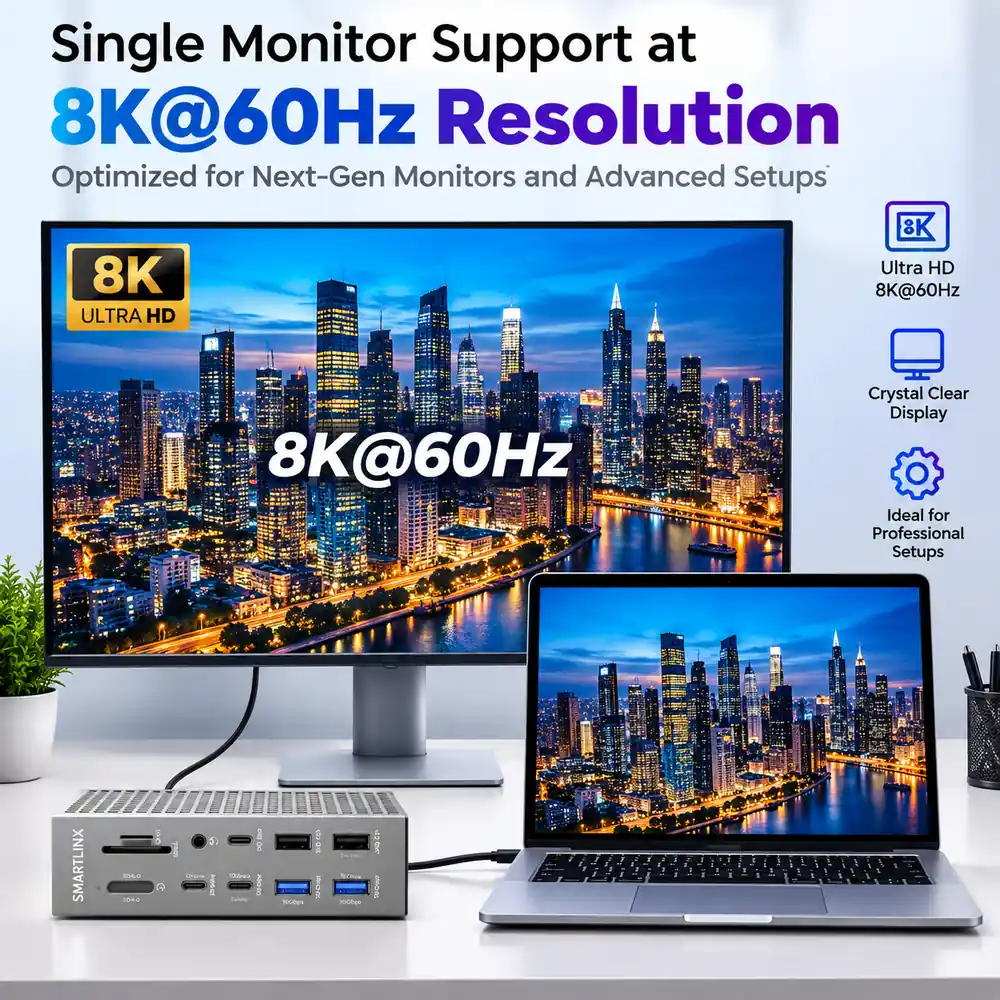
It supports two external monitors at 4K 60Hz. Video goes out through one HDMI port and two Thunderbolt 4 ports. Two things have to be true.
Windows laptops from 8th Generation Intel Core onward meet both. Macs meet the second at the Pro, Max and Ultra tiers, and at the base tier only on M4 chips and on M3 chips with the lid shut.
Six settings account for most Thunderbolt dock use.
Five checks decide whether any dock fits a desk.
────────────────────────
SMARTLINX CONNECTIVITY HARDWARE
Buy directly from the Smartlinx store on Amazon. If you are specifying hardware for several rooms, or you want compatibility confirmed before you commit, our team will work through it with you.
Deploying across multiple rooms or specifying for a client project? Contact us at info@smartlinx.pro for volume and project pricing.
Every Smartlinx product is designed to expand your workspace. Smartinx simplify your setup and support focused work — at the office, at home or in transit.