$149.99
Amazon Rating
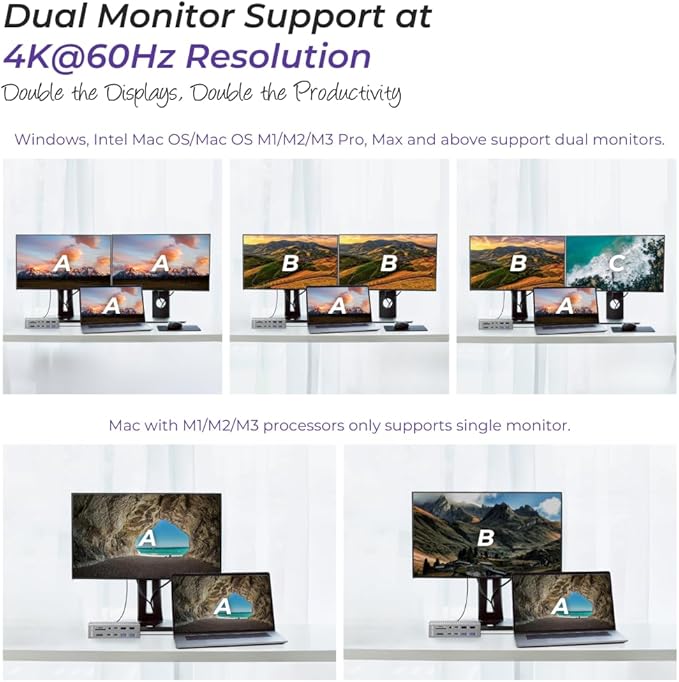
UP TO 5 MONITORS FROM ONE LAPTOP: A Windows Thunderbolt 4 laptop runs five external screens, extended or mirrored. Macs land lower, MacBook Pro and Max models extend across four, and base M1 through M3 chips extend across three . Base Apple Silicon manages one external screen unaided, a limit set by Apple rather than by any dock and the built-in DisplayLink controller lifts it.
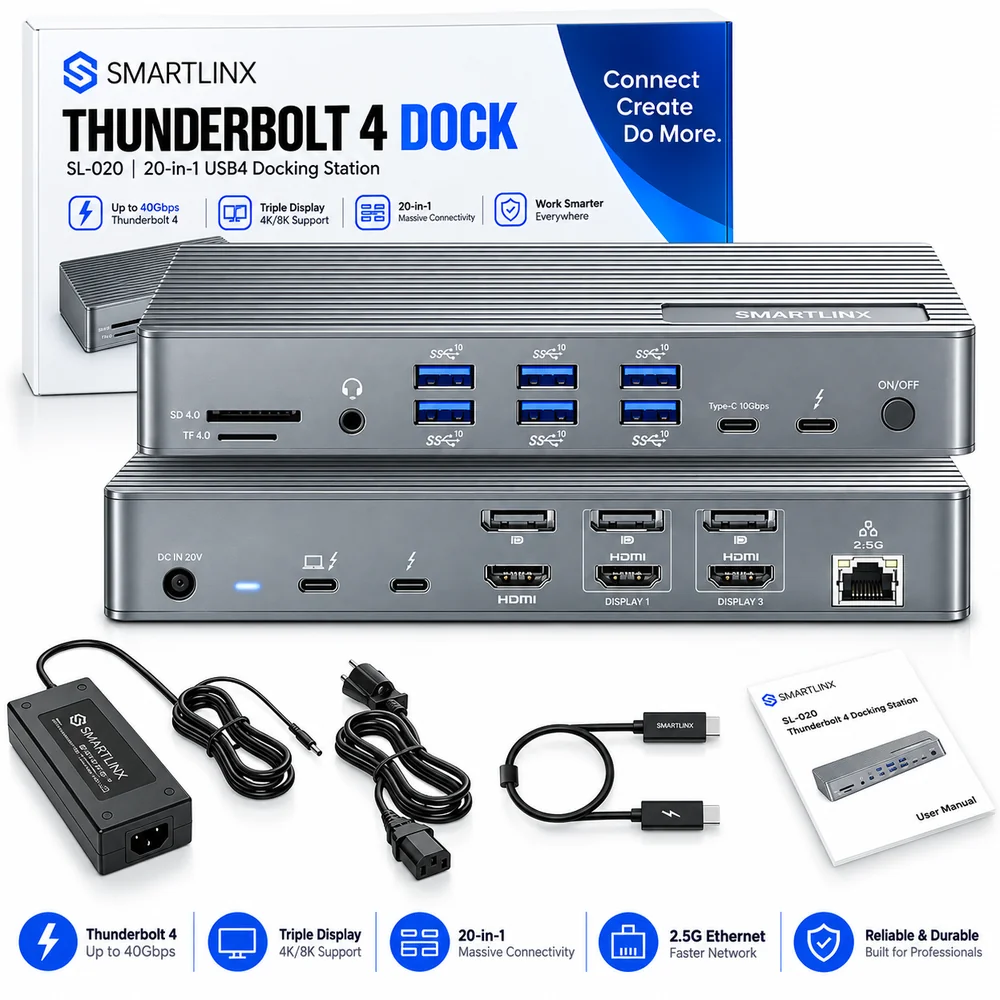
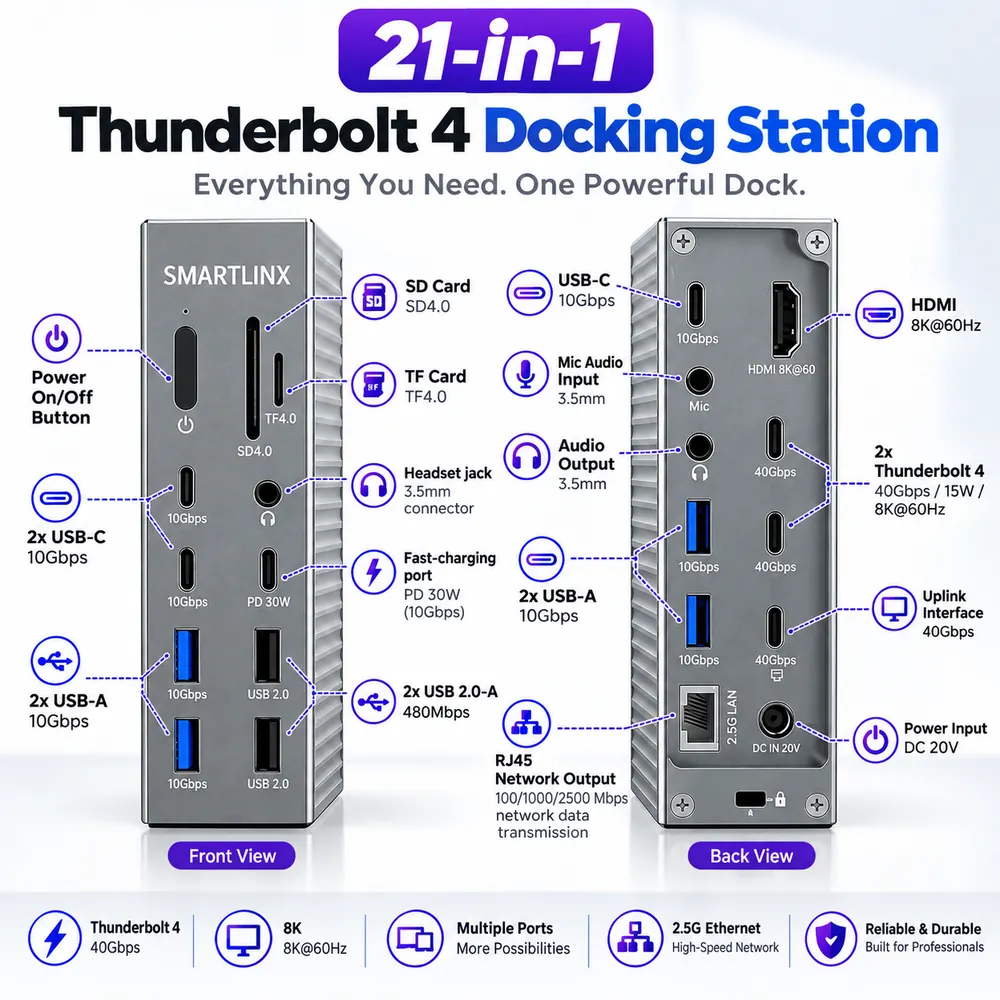
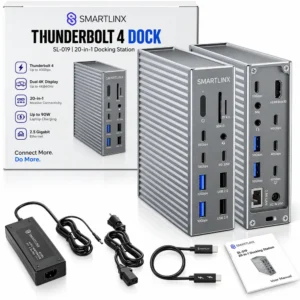
21 PORTS, EACH ON ITS OWN CHIP: HDMI and DisplayPort video, 2.5Gbps Ethernet, separate SD and microSD slots usable at the same time, a 3.5mm audio and microphone jack, plus 6 USB-A and 1 USB-C at 10Gbps. Independent chips per function mean nothing slows down when several run at once.
90W CHARGING FROM A 150W ADAPTER: It covers MacBook Air and the 14-inch MacBook Pro at their normal charging speed while every peripheral stays connected. A 16-inch MacBook Pro charges too, just not at its full 140W turbo rate. Other ports keep a phone, tablet or power bank topped up.
40GBPS THUNDERBOLT 4, BUILT FOR VIDEO EDITORS: It moves 4K and 8K footage, Time Machine backups and Final Cut or Premiere project libraries at full Thunderbolt speed through the Thunderbolt and USB-C ports, so external drives never become the bottleneck.
① For volume orders or business inquiries contact info@smartlinx.pro
On 2 or more orders .
Returns within 30 days.
With Shop Pay, for US residents.
The SL-020 replaces individual laptop connections with one Thunderbolt 4 cable . Attaching that cable connects every screen, drive, keyboard, network and audio device wired to the dock and charges the laptop at the same time. A single 40Gbps link carries video, PCIe data, USB data and power together. Pulling the cable releases everything in one action. Desks where a laptop moves daily gain the most, since reconnecting six cables each morning costs real time.
Ten features define the SL-020 led by DisplayLink multi-monitor output and 90W charging.
| Feature | What it delivers |
|---|---|
| Up to 5 monitors | Five extended on Windows, four on MacBook Pro and Max, three on base M1–M3 |
| DisplayLink chipset | Drives screens past the Thunderbolt ceiling, lifting Apple’s one-monitor limit |
| Native Thunderbolt 4 video | One screen at 8K@60Hz or two at 4K@60Hz, no driver |
| 40Gbps bandwidth | 4K and 8K footage, Time Machine backups, Final Cut and Premiere libraries at full speed |
| 90W host charging | Powers the laptop through the same cable carrying video and data |
| 2.5Gbps Ethernet | Wired network speed above standard gigabit |
| Dual card readers | SD and microSD read together, so card offloads need no swapping |
| 6 USB-A and 1 USB-C at 10Gbps | Keyboards, mice, headsets, and drives connect without a second hub |
| Independent chip per function | Video, storage, and network hold their speeds concurrently |
| 12-month warranty | Smartlinx US-based support |
The SL-020 is a Thunderbolt 4 docking station with 21 ports, 40Gbps bandwidth and a DisplayLink video chipset .
| Attribute | Value |
|---|---|
| Model | SL-020 |
| Product type | Thunderbolt 4 docking station |
| Host interface | Thunderbolt 4 |
| Total bandwidth | 40Gbps |
| Port count | 21 |
| Video chipsets | Native Thunderbolt 4 and DisplayLink |
| Maximum monitors, extended | 5 on Windows |
| Maximum single-screen resolution | 8K@60Hz |
| Dual-screen resolution | 4K@60Hz each |
| DisplayLink resolution | 4K@60Hz, then 4K@30Hz |
| Host charging output | 90W |
| Power adapter | 150W |
| Ethernet | 2.5Gbps |
| USB-A ports | 6 at 10Gbps |
| USB-C port | 1 at 10Gbps |
| Card readers | SD and microSD, simultaneous |
| Audio | 3.5mm combined audio and microphone |
| Hardware interfaces | Ethernet, HDMI, Thunderbolt, USB 3.0, USB Type-C |
| Colour | Grey |
| Housing | Anti slip |
The SL-020 carries 21 ports, each running on its own chip so nothing slows down when several work at once.
| Group | Ports |
|---|---|
| Video | HDMI and DisplayPort |
| Data | 6 USB-A at 10Gbps, 1 USB-C at 10Gbps |
| Thunderbolt | Host connection carrying video, data, and 90W charging, plus a downstream Thunderbolt 4 port at 40Gbps |
| Network | 2.5Gbps Ethernet |
| Storage | SD and microSD card slots, usable at the same time |
| Audio | 3.5mm combined audio and microphone jack |
It connects to MacBook and other Mac computers with a Thunderbolt 4 port or a USB-C port supporting DisplayPort Alt Mode. And to Windows and Linux laptops with the same port type . Every MacBook from Intel through M4 works.
| Host type | Capability |
|---|---|
| Thunderbolt 4 — 11th-gen Intel Core and newer | Full. All ports at rated speed. |
| Thunderbolt 3 — 8th to 10th-gen Intel Core | Video, data, Ethernet and charging function at Thunderbolt 3 bandwidth. |
| USB-C with DisplayPort Alt Mode | Video and USB data function. PCIe tunnelling does not, so downstream Thunderbolt storage stays offline |
| USB-C without DisplayPort Alt Mode | No video through the dock. |
Windows and Linux machines connect through a Thunderbolt or USB-C DisplayPort Alt Mode port. Windows hosts reach five extended screens — two natively, three through DisplayLink once its driver is installed.
Every MacBook from Intel through M4 connects for charging, storage and the full port hub. Base M1, M2, and M3 chips support one external screen natively, a ceiling set by Apple’s display controller rather than by any dock. DisplayLink Manager raises those machines to three extended screens . Pro and Max models reach four.
Intel Macs run one screen at 8K@60Hz plus a second at 4K@60Hz, at Thunderbolt 3 bandwidth.
The SL-020 charges a connected laptop at 90W through the Thunderbolt 4 uplink, drawing from the 150W power supply in the box .
| Laptop | Charging behaviour |
|---|---|
| MacBook Air | Normal charging speed |
| MacBook Pro 14-inch | Normal charging speed |
| MacBook Pro 16-inch | Charges, below its 140W turbo rate |
| Windows laptops rated 90W or below | Normal charging speed |
| Phones, tablets, power banks | Topped up from the other ports |
A DisplayLink chipset separates the two models . Both carry 21 ports and a Thunderbolt 4 host interface.
| Attribute | SL-019 | SL-020 |
|---|---|---|
| Price | $149.99 | $229.99 |
| Host interface | Thunderbolt 4 | Thunderbolt 4 |
| DisplayLink chipset | No | Yes |
| Extended monitors, Windows | 2 | 5 |
| Port count | 21 | 21 |
Buyers connecting one or two screens gain nothing from the more expensive model.
The SL-020 suits laptop users running three or more monitors, especially anyone whose machine limits them natively.
| User | Application |
|---|---|
| MacBook Air and base chip MacBook Pro owners | Breaks Apple’s single-screen ceiling |
| Video editors | 4K and 8K footage, Final Cut and Premiere libraries across Thunderbolt storage |
| Financial and trading desks | Four to five simultaneous chart windows |
| Software developers | Code, documentation, terminal, and test output separated |
| Hybrid workers | A full desk reconnected with one cable |
| IT departments | One dock across mixed Windows, macOS, and Linux fleets |
Smartlinx publishes screen counts per host chip, split by extended and mirrored mode, and names the chipset that produces them.
| Reason | Detail |
|---|---|
| The mechanism explained | Native Thunderbolt and DisplayLink paths stated separately |
| Per-chip guidance | M1 through M4, Pro, Max, Intel Mac, Windows, Linux |
| Stated limitations | HDCP behaviour and the driver requirement published before purchase |
| User manual online | Available before ordering |
| 12-month warranty | Smartlinx, a US-registered company |
| 30-day returns | Through Amazon fulfilment, with product support included |
Two at 4K@60Hz each or one at 8K@60Hz . Intel sets that as a Thunderbolt 4 specification requirement. So port count makes no difference, 21-port dock and a 5-port dock both stop at two on the native path. Exceeding two requires a DisplayLink chipset, which sends additional screens over USB rather than through the Thunderbolt video tunnel . The SL-020 includes one reaching five extended screens on Windows and three on base Apple Silicon.
Yes. Thunderbolt 4 carries DisplayPort video alongside data and power on a single cable. The specification requires host support for two monitors at 4K@60Hz or one at 8K@60Hz and Display Stream Compression makes the 8K figure achievable. A laptop’s own display controller can impose a lower limit base Apple Silicon chips allow one external screen regardless of which dock is attached.
A device expanding one Thunderbolt 4 port into many. A single 40Gbps cable carries video, PCIe data, USB data and charging power together. So attaching it connects every monitor, drive, keyboard and network cable at once. The SL-020 provides 21 ports, including HDMI and DisplayPort video, 2.5Gbps Ethernet, SD and microSD readers, 6 USB-A ports, and 90W laptop charging.
Yes. Thunderbolt 5 is backward compatible with Thunderbolt 4 and Thunderbolt 3 . A Thunderbolt 5 laptop attached to a Thunderbolt 4 dock operates at Thunderbolt 4 speeds — 40Gbps rather than 80Gbps. The SL-020 implements Thunderbolt 4, so a Thunderbolt 5 host gains no extra bandwidth from it.
Yes. Every MacBook from Intel through M4 connects for charging, storage and the full port hub . Apple’s display controller caps base M1, M2, and M3 chips at one external screen natively, a limit belonging to the laptop rather than to any docking station . Installing DisplayLink Manager raises those machines to three extended screens . Anyone running a single external monitor needs no driver.
Ethernet, USB, card readers, audio, charging and the first two screens all work driver free. Screens beyond that pair route through the DisplayLink chipset , which requires its driver on Windows or the DisplayLink Manager application on macOS. Both are free downloads from DisplayLink .
Netflix plays on monitors wired to the native Thunderbolt path . Streaming services apply HDCP protection and DisplayLink outputs carry no HDCP , leaving Netflix, Disney+ and Prime Video blank on those screens. Protected content plays only on a native output.
SMARTLINX CONNECTIVITY HARDWARE
Buy directly from the Smartlinx store on Amazon. If you are specifying hardware for several rooms, or you want compatibility confirmed before you commit, our team will work through it with you.
Deploying across multiple rooms or specifying for a client project? Contact us at info@smartlinx.pro for volume and project pricing.
Every Smartlinx product is designed to expand your workspace. Smartinx simplify your setup and support focused work — at the office, at home or in transit.